
Cordex-Reference: free reference data for Dataverse42 reference tables, live in Dataverse.
Cordex-Reference puts curated reference data, from SNOMED CT-AU and LOINC to countries, currencies and the GBIF taxonomy, inside Microsoft Dataverse as read-only virtual tables, served live from the Cordex Terminology API. The solution is free; your API plan decides which data you see.
Read only. Served live from the Cordex Terminology API.
See it in action


Authoritative codes without the data work.
Your apps get authoritative codes without importing, storing or refreshing reference data yourself.
No data loads
Tables read live from the Cordex Terminology API, so every user sees the current release.
Native Dataverse
Views, quick find, forms and Advanced Find work like any other table in a model-driven app.
Install everything, unlock what you need
Install every table; your licence key decides which ones return data.
New tables included
Your licence key unlocks every future table added to the family it covers, at no extra cost. Enterprise covers new families too.
Less load on your apps
A permanent filter per table, such as Australian states only, keeps queries small.
Your key stays yours
It is stored in your environment and is not included in solution exports.
42 tables in five families.
Each family is grouped in the app's navigation and listed alphabetically.
A virtual table on every dataset.
Each table is a Dataverse virtual table backed by the Cordex Reference data provider.
A user opens a view, searches or opens a record in a model-driven app.
Dataverse passes the query to the Cordex Reference plug-in in your environment.
The plug-in calls the Cordex Terminology API with your licence key, adding the table's permanent filter.
The API checks the key on every call and returns only the data your plan covers.
Dataverse shows the rows like any other table. Nothing is copied into your database.
The solution is free. Your plan unlocks the data.
Data comes with a Cordex Terminology API plan. Prices in USD, billed yearly.
- ✓One environment can hold several keys, one per plan. Where two keys cover a table, the higher plan applies.
- ✓One seat covers one environment, for example production or UAT.
- ✓All users in an environment share that key's calls per minute.
- ✓A cancelled or revoked key stops returning data on the next call.
Only see the data that matters to you.
Shape each table to how your organisation works, all from the admin page. No code, and nothing copied into your database.
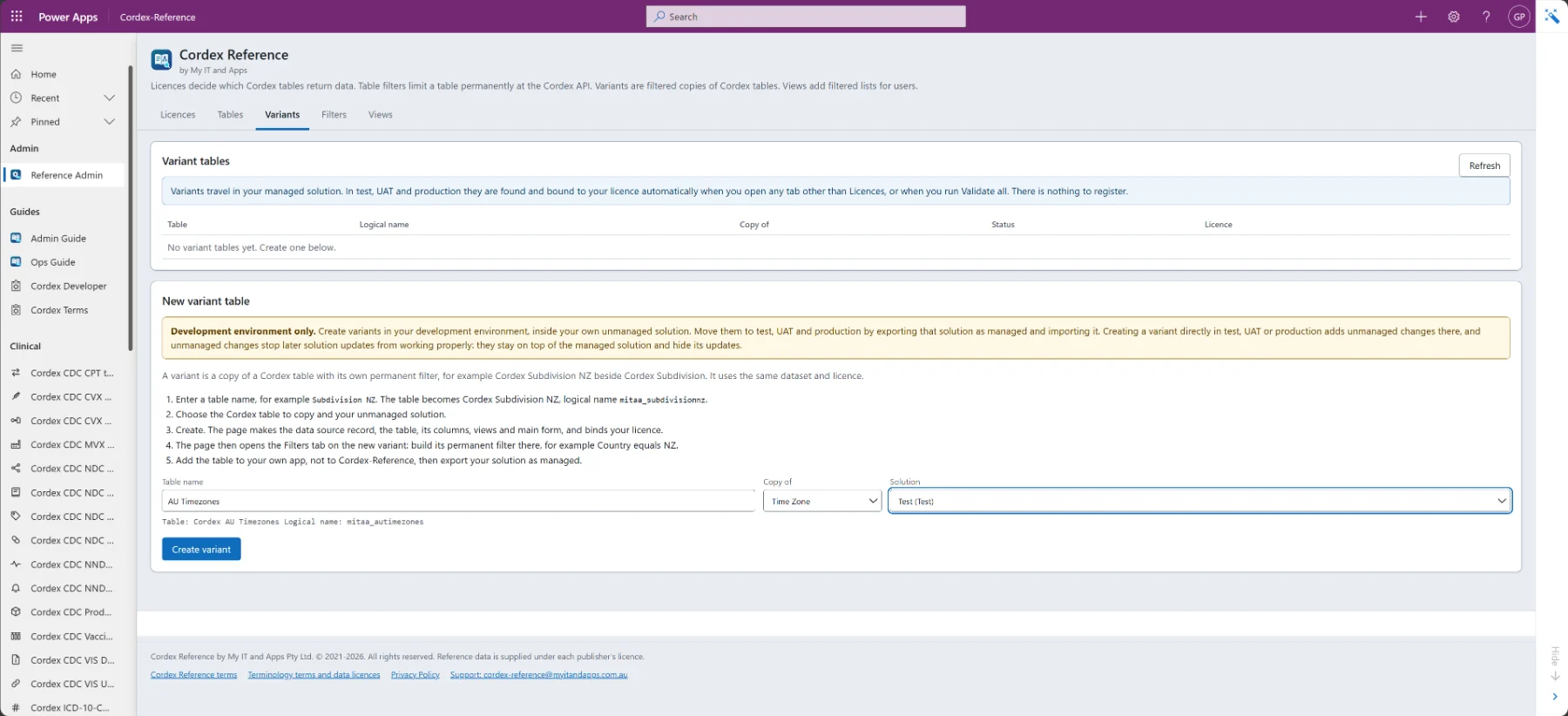
Create your own variant tables
Make your own copy of any Cordex table, with the same dataset and licence but its own permanent filter. Register it once on the admin page and it works like any other table.
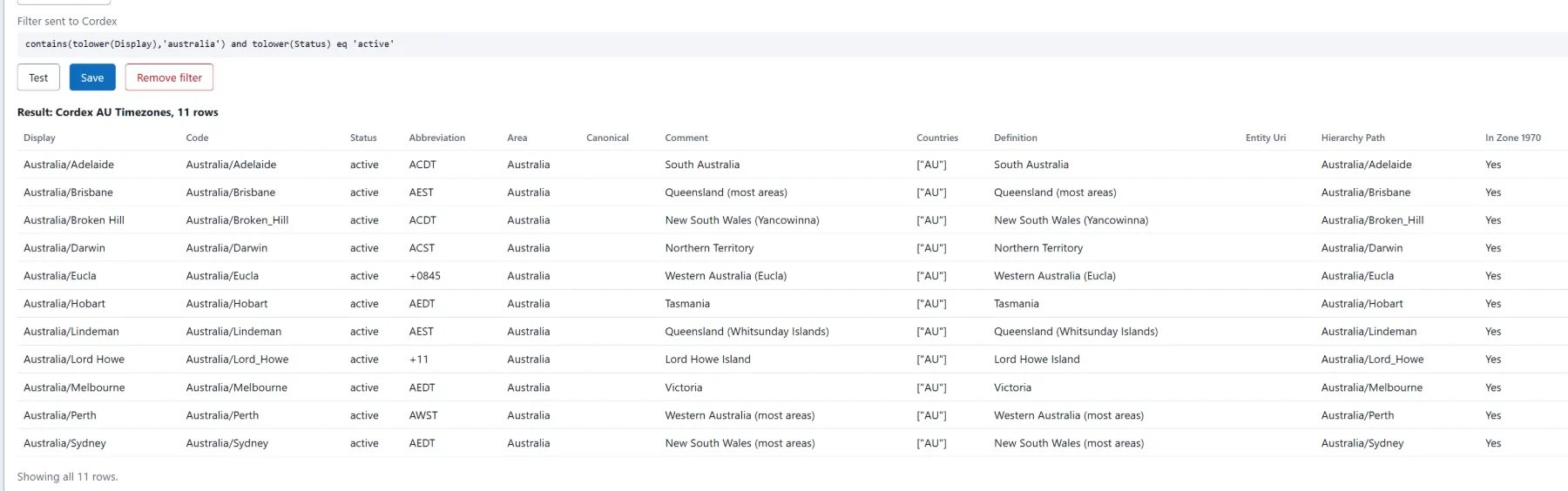
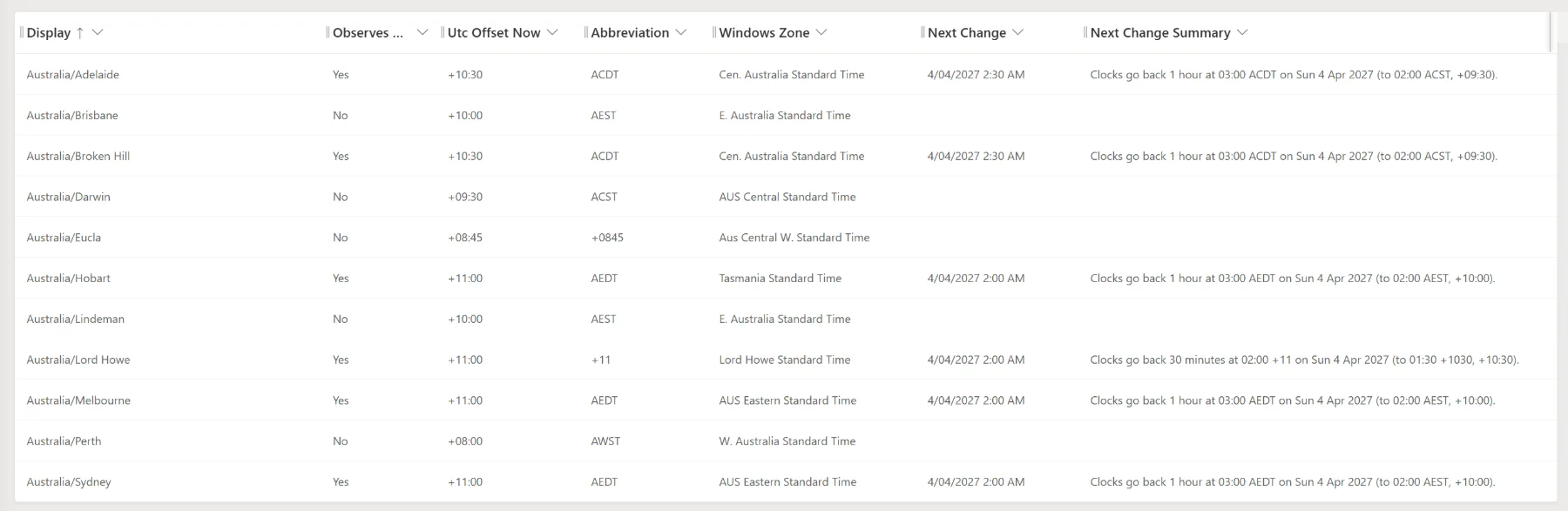
For example: Time Zones (AU) showing only Australian time zones, next to the full Time Zones table, or Subdivision AU and Subdivision NZ.
Keep each table focused
Give a table a fixed filter so it only ever returns what you need. The filter is applied at the Cordex API, so queries stay small and fast.
For example: Countries limited to the Asia-Pacific region, or the taxonomy limited to one kingdom.
Add views in the order you want
Use the view wizard to pick the columns, add conditions and choose the sort order, then publish the view for your users. Each view is checked before it is saved.
For example: Australian states sorted by name, or currencies sorted by code.
Everything in one admin page.
A built-in Cordex Reference Administration page manages licences, tables, filters and views in one place.
Worked example: build a filtered table of Australian time zones. Clinical teams: SNOMED CT-AU in Dynamics 365.
Set up in a few minutes.
Setup takes a few minutes for a Dataverse System Administrator. Every step is covered in the Admin Guide.
Buy a Cordex Terminology API plan and copy your licence key.
Import the Cordex-Reference managed solution into your Dataverse environment.
Open the Cordex-Reference app, then Cordex Reference Administration.
Add your key on the Licences tab and select Validate all.
Open any table in the app; licensed tables return data straight away.
Requires a Microsoft Dataverse environment with model-driven apps, such as Dynamics 365 or Power Apps. Data is read only.
Frequently asked questions
Is Cordex-Reference free?+
Yes. The solution is free. Data comes with a Cordex Terminology API plan, and your plan decides which tables return data.
Is any data copied into my environment?+
No. Each table is a read-only Dataverse virtual table. Rows are read live from the Cordex Terminology API on every view, search or record open.
Can I install every table even if I only have one plan?+
Yes. Install all 42 tables. Tables your key does not cover return no data until you add a plan that covers them.
Can I use more than one key?+
Yes. One environment can hold several keys, one per plan. Where two keys cover a table, the higher plan applies.
How many environments does a plan cover?+
One seat covers one environment, for example production or UAT. All users in an environment share that key's calls per minute.
Where is my licence key stored?+
In your environment. It is not included in solution exports.
What happens if a key is cancelled?+
A cancelled or revoked key stops returning data on the next call.
What do I need to run it?+
A Microsoft Dataverse environment with model-driven apps, such as Dynamics 365 or Power Apps, and a Dataverse System Administrator to install it. Data is read only.
Talk to a human at My IT & Apps
Ask about setup, permanent filters, which plan covers the tables you need, or an Enterprise agreement. Send us the details and we'll get back to you.
cordex-reference@myitandapps.com.auA My IT & Apps product · myitandapps.com.au